 Adding Favourites
Why this helps
When you’re deep in a project season—maybe billing week, or a launch sprint—you don’t want to scroll through a long list every time you switch contexts. Favourites let you pin the Stax that matter right now to the top, so your brain doesn’t have to search. It’s a focus filter: keep the current priorities visible, and everything else stays one click away when you need it.
How to favourite a Stax
- Open the My Stax dropdown.
- Click the Stax you want to favourite to expand it.
- Click the star icon in the header bar.
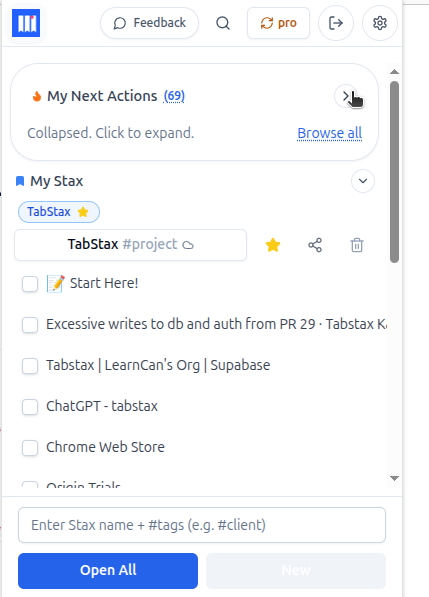
The Stax now appears as a pill above your Stax list—quick access without opening the dropdown.
What you get
- Up to 3 pills appear above the list at any time. Click a pill to open that Stax directly.
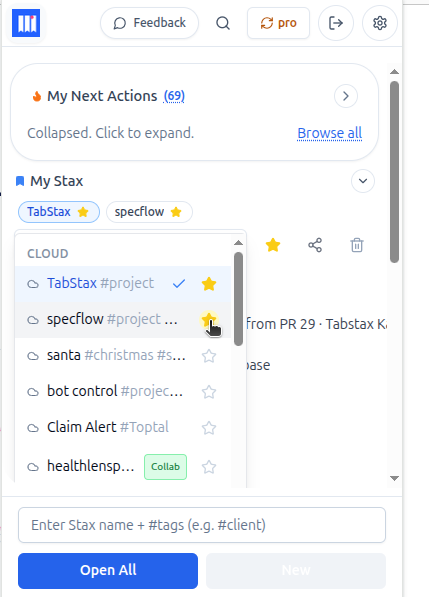
- Favourite as many as you like—they’ll all appear at the top of the dropdown, marked with a star. The pills just show the top 3 for focus.
How to unfavourite
- Click the Stax in the dropdown to expand it.
- Click the star icon again to remove the favourite.
The pill disappears and the Stax drops back into its normal spot in your list.
Now you can…
Keep your current priorities one click away without scrolling. When a project wraps or a deadline passes, unfavourite it and promote the next thing that matters. If everything is a priority, nothing is—three pills keeps your focus tight.
Related guides:
- Understanding the main popup – navigate next actions and open Stax
- Creating your first Stax – step-by-step guide with a real example
- What is a Stax? – deep dive into the core concept